Models and Web API
This part of documentation will explore all what Djask can do with your SQLAlchemy models.
Preparations
Above all, let’s start with a simple demo.
Our demo
"""
This app.py is just a simple demo. Do not write code like this in production.
"""
from djask import Djask
from djask.admin import Admin
from djask.db import Model
from djask.auth.abstract import AbstractUser
import sqlalchemy as sa


class Post(Model):
    title = sa.Column(sa.String(255), index=True)
    content = sa.Column(sa.Text)
    author = sa.orm.relationship("User", back_populates="posts")
    author_id = sa.Column(sa.ForeignKey("user.id"))


class User(AbstractUser, Model):
    posts = sa.orm.relationship("Post", back_populates="author")


# 1
app = Djask(__name__, {"AUTH_MODEL": User})
admin_ext = Admin()  # initialize the admin site
admin_ext.init_app(app, mode="api") # 2
db = app.db

app.config["AUTH_MODEL"] = User


@app.before_first_request
def init_db():
    db.drop_all()
    app.register_model(Post) # 3
    db.create_all()
    admin = User(username="test", is_admin=True)
    admin.set_password("password")
    db.session.add(admin)
    db.session.commit()
    db.create_all()
Some explanations
Here are some explanations to the demo above.
# 1: We passed a config dict directly to the app.
Inside the dict, we declared the customized AUTH_MODEL, if
you don’t specify it, User is the default.
Djask will automatically register this model for you.
# 2: We selected a mode named api, another available
option is ui which stands for the admin frontend interface.
The default value passed is ("api", "ui") which contains both
web api and admin frontend interface.
# 3: We registered the Post model.
Other preparations
Djask automatically generates a web API for your models. In this documentation, we will use httpie to test our web API. You can install it using your system’s package manager or pipx.
Models
Djask provides two types of base models, Model and PureModel.
Model is initialized with three columns, id, created_at and updated_at, and
instances of this class can be registered by app.register_model() or blueprint.register_model().
PureModel is similar to Model, but it has no columns when it’s created.
Therefore, it CANNOT be registered to the admin interface by app.register_model() or blueprint.register_model(). If
it’s passed to app.register_model() or blueprint.register_model(), it will raise an error.
Authentication & the user API
Djask’s default web api uses bearer tokens to authenticate users. Note that if the user doesn’t have admin access, the authentication will fail.
Getting your token
http --form :5000/admin/api/token username=test password=password
You’ll see something like this:
HTTP/1.0 200 OK
Cache-Control: no-store
Content-Length: 213
Content-Type: application/json
Date: Sun, 23 Jan 2022 04:33:59 GMT
Pragma: no-cache
Server: Werkzeug/2.0.2 Python/3.9.9

{
    "access_token": "eyJhbGciOiJIUzUxMiIsImlhdCI6MTY0MjkxMjQzOSwiZXhwIjoxNjQyOTE2MDM5fQ.eyJpZCI6MX0.70UFeHYAsPc12G002_3skcbi88_Q_oTG08uBxdC7dfJJ-uxkwpJ9wHvNz2Occ1APL_8xtVNXEkXiaq_VZms-Wg",
    "expires_in": 3600
}
Creating a user
Copy the access_token above and save it into a session.
http --json :5000/admin/api/user username=test2 password=password Authorization:"eyJhbGciOiJIUzUxMiIsImlhdCI6MTY0MjU2NzM0OSwiZXhwIjoxNjQyNTcwOTQ5fQ.eyJpZCI6MX0.E7Mr_9tWdaGK_Kz4JBoJXJkmSNdKgb2QA4xGBl0JlQnJMFt-cG1GHhxhrSq61ip9NiY5czYeWxfo1FUNJB-flw" --session=Authorization

HTTP/1.0 201 CREATED
Content-Length: 211
Content-Type: application/json
Date: Sun, 23 Jan 2022 04:36:22 GMT
Server: Werkzeug/2.0.2 Python/3.9.9

{
    "created_at": "Sun, 23 Jan 2022 04:36:22 GMT",
    "email": null,
    "id": 2,
    "is_admin": false,
    "name": null,
    "posts": [],
    "updated_at": "Sun, 23 Jan 2022 04:36:22 GMT",
    "username": "test2"
}
Retrieving a user
http GET :5000/admin/api/user/1 --session=Authorization

HTTP/1.0 200 OK
Content-Length: 209
Content-Type: application/json
Date: Sun, 23 Jan 2022 05:00:04 GMT
Server: Werkzeug/2.0.2 Python/3.9.9

{
    "created_at": "Sun, 23 Jan 2022 04:37:59 GMT",
    "email": null,
    "id": 1,
    "is_admin": true,
    "name": null,
    "posts": [],
    "updated_at": "Sun, 23 Jan 2022 04:37:59 GMT",
    "username": "test"
}
Since we haven’t declared the real name and the email of the test user, it’s normal to get a null value.
Updating a user
http --json PUT :5000/admin/api/user/1 username="abc" --session=Authorization

HTTP/1.0 200 OK
Content-Length: 208
Content-Type: application/json
Date: Sun, 23 Jan 2022 05:00:39 GMT
Server: Werkzeug/2.0.2 Python/3.9.9

{
    "created_at": "Sun, 23 Jan 2022 04:37:59 GMT",
    "email": null,
    "id": 1,
    "is_admin": true,
    "name": null,
    "posts": [],
    "updated_at": "Sun, 23 Jan 2022 04:37:59 GMT",
    "username": "abc"
}
Deleting a user
Warning
This operation might delete the admin user. You can create a new admin user by
running flask admin create in your terminal.
http DELETE :5000/admin/api/user/2 --session=Authorization

HTTP/1.0 204 NO CONTENT
Content-Type: application/json
Date: Sun, 23 Jan 2022 05:03:32 GMT
Server: Werkzeug/2.0.2 Python/3.9.9
API for other models
Djask has a general web api applicable for all the data models as long as you register
the data models to the app with register_model() or register_models().
Data persistence
The simple demo above only persists the data in memory. Therefore, if it’s reloaded, the data will be lost. You should recreate the instances again after reloading the app or try using MySQL or Postgres, etc. to persist the data.
Creating an instance
http --json POST :5000/admin/api/post title=hello content=world author_id=1 --session=Authorization

HTTP/1.0 201 CREATED
Content-Length: 399
Content-Type: application/json
Date: Sun, 23 Jan 2022 05:03:51 GMT
Server: Werkzeug/2.0.2 Python/3.9.9

{
    "author": {
        "created_at": "Sun, 23 Jan 2022 04:37:59 GMT",
        "email": null,
        "id": 1,
        "is_admin": true,
        "name": null,
        "updated_at": "Sun, 23 Jan 2022 04:37:59 GMT",
        "username": "abc"
    },
    "author_id": 1,
    "content": "world",
    "created_at": "Sun, 23 Jan 2022 05:03:51 GMT",
    "id": 1,
    "title": "hello",
    "updated_at": "Sun, 23 Jan 2022 05:03:51 GMT"
}
Retrieving an instance
http GET :5000/admin/api/post/1 --session=Authorization

HTTP/1.0 200 OK
Content-Length: 177
Content-Type: application/json
Date: Fri, 21 Jan 2022 03:29:02 GMT
Server: Werkzeug/2.0.2 Python/3.9.9

{
    "author_id": 1,
    "content": "world",
    "created_at": "Fri, 21 Jan 2022 03:28:17 GMT",
    "id": 1,
    "title": "hello",
    "updated_at": "Fri, 21 Jan 2022 03:28:17 GMT"
}
Updating an instance
http --json PUT :5000/admin/api/post/1 title=hello2 content=world2 --session=Authorization

HTTP/1.0 200 OK
Content-Length: 399
Content-Type: application/json
Date: Sun, 23 Jan 2022 05:04:20 GMT
Server: Werkzeug/2.0.2 Python/3.9.9

{
    "author": {
        "created_at": "Sun, 23 Jan 2022 04:37:59 GMT",
        "email": null,
        "id": 1,
        "is_admin": true,
        "name": null,
        "updated_at": "Sun, 23 Jan 2022 04:37:59 GMT",
        "username": "abc"
    },
    "author_id": 1,
    "content": "world",
    "created_at": "Sun, 23 Jan 2022 05:03:51 GMT",
    "id": 1,
    "title": "hello",
    "updated_at": "Sun, 23 Jan 2022 05:03:51 GMT"
}
Deleting an instance
http DELETE :5000/admin/api/post/1 --session=Authorization

HTTP/1.0 204 NO CONTENT
Content-Type: application/json
Date: Sun, 23 Jan 2022 05:04:46 GMT
Server: Werkzeug/2.0.2 Python/3.9.9
API Docs
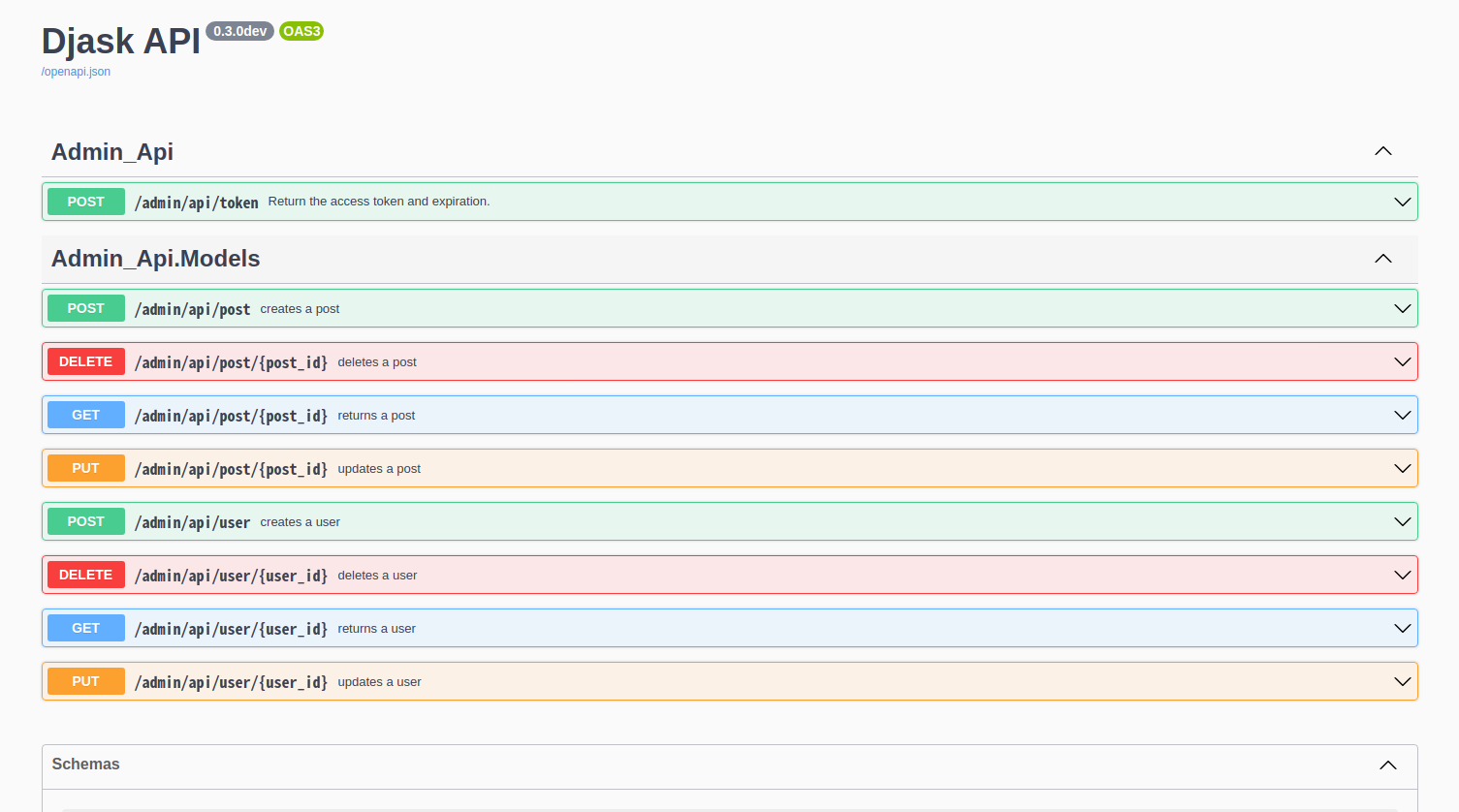
Djask extends APIFlask to provide API documentation for all registered models. Currently, Djask’s API documentation will not reflect the relationships between models.
Here is a demo.
Swagger UI
The default path of Swagger UI is /admin/api/docs.
Redoc
Similarly, the default path of Redoc is /admin/api/redoc.
